Trial Sessions / Registration on Your Own Website
Overview
The Box-planner platform enables straightforward integration of trial training registrations and appointment booking directly onto your website, supporting multiple languages.
Setup and Configuration
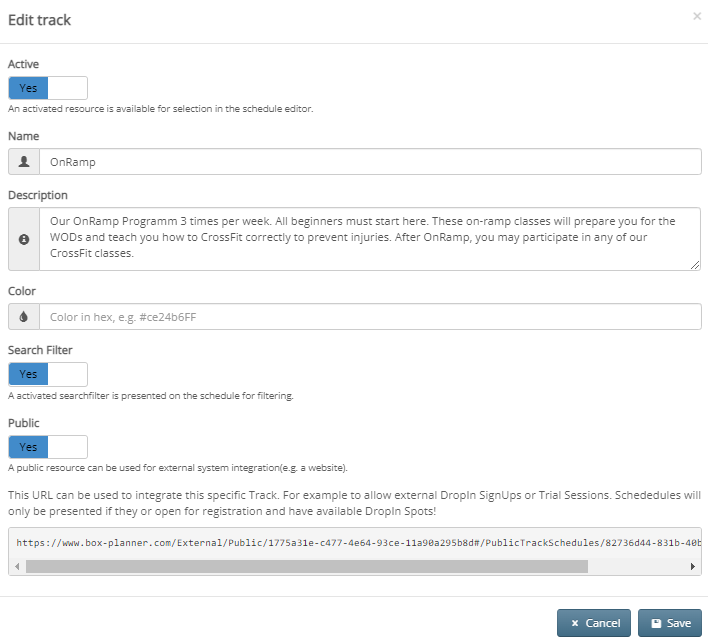
To begin, you must activate the hour type (track) designated for external integration by toggling the "Public" switch. Once enabled, the system displays the integration link needed for website embedding.
Additionally, DropIns must be activated for classes within the corresponding track to allow external registrations.
Testing the Integration
After configuration is complete—with the track activated, DropIns enabled, and classes open for registration—users can access the integration link to view available classes. Upon selecting an appointment, they encounter a straightforward contact form for submission.
URL Customization Options
The interface supports language and display modifications through URL parameters:
- Language selection:
/de(German) or/en(English) - Show participation indicators: Add
/trueto display attendance bubbles - Track specification: Include track ID (e.g.,
/00000) - Hide descriptions: Add
/trueto conceal track description text - Force DropIn mode: Use
?lang=de&forceDropIn=trueto enable DropIn for all classes regardless of login status
Video Tutorial
A video demonstration accompanies this guide for visual reference.